


Updated: March 7, 2026
Originally published: February 15, 2022
The Public Employee Retirement System, also known as PERS, is the retirement system used for most public service workers of Oregon. Founded in 1946, PERS allows employers to provide retirement benefits to their workers, including pensions, death benefits, and retiree health insurance.
PERS is now only used for individuals hired prior to 2003 – workers hired after that are part of the Oregon Public Service Retirement Plan, or OPSRP.
If you were hired after 2003, click here to jump over to our OPSRP explainer article + video.
Members of PERS can expect to receive an annual statement – but what exactly can that statement tell you, and how can you use that information to better plan for your future retirement?
We’re walking you through the different sections of your Tier 1 and 2 annual PERS statement to give you all the details you need for making informed financial planning decisions.
How to Read Your Oregon PERS Statement
We’ll be looking at a sample PERS Tier 1 & 2 Annual Statement.
Section 1: Personal information
The first section of your statement will include all of your personal information, such as your address, birth date, and PERS ID. Your ID number is used for all communications between you and PERS – you’ll find it on all of your statements and use it any time you fill out a form for PERS.
Below that, you’ll see your first hire date, membership date, and job classification.
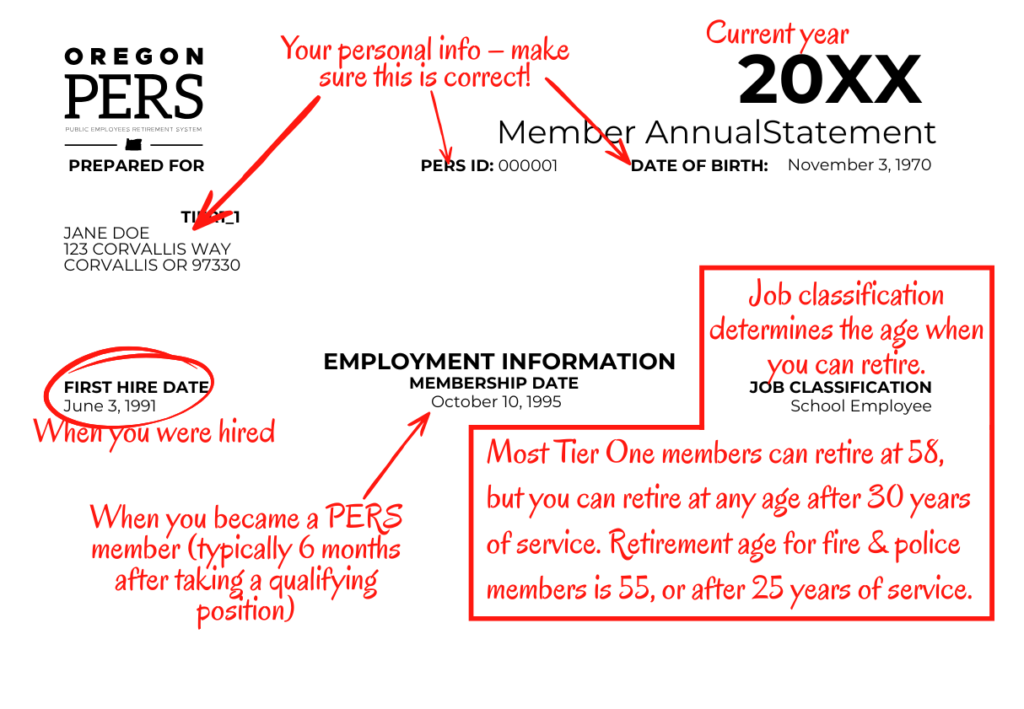
Your membership date differs from your first hire date in that it represents the first day you were eligible for PERS retirement contributions, rather than the day you began work. For most, the membership date will fall about six months after their first hire date. For Tier Two members, you may be able to “purchase” your six-month waiting period. This is done when you establish your retirement date.
Section 2: Pension Information
Your Oregon PERS retirement benefit is comprised of two parts: your pension and your IAP. First, we’ll look at your pension information.
The pension section tells you what you currently have in your Tier One or Two pension. The statement is based on information from your employer and annual earnings credited as of Dec. 31 of the prior year. It is not based on the date you receive the statement.
There are two possible types of accounts here:
- A regular account – Every Tier One and Two PERS member has a regular account. The PERS board determines the earnings rate every two years, but it generally doesn’t change much. As of March 2026, the 6.9% earnings rate has been in effect since 2022.
- A variable account – You can opt into a Variable Annuity Program (VAP), which has an earnings rate based on market fluctuations.
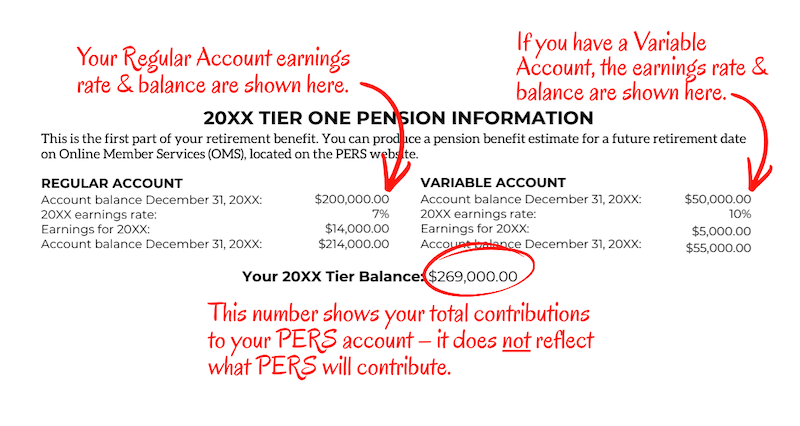
The variable account is considered a higher risk option that generally also offers higher reward. You might have a variable account, a regular account, or both.
The numbers here don’t necessarily represent your total pension, though, since it doesn’t include what PERS will contribute. Members can choose a fixed pension amount or keep their variable account at retirement.
Those who choose the variable pension will have variable amounts each month based on the investment returns. You have 60 days after retirement to change back to a fixed amount.
Section 3: Service Credits
Beneath your balance, you’ll find your service credits. The total service credit is the number PERS uses to calculate your retirement benefits. You must work at least 600 hours per calendar year and the majority of each month to earn credit for an entire year.
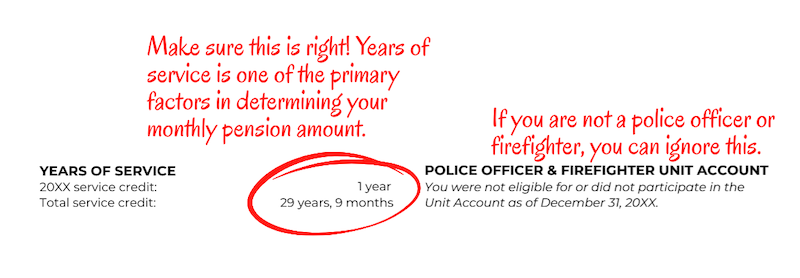
To the right, you’ll find the “Police Officer and Firefighter Unit Account” – unless you have worked in either of those professions, you can ignore that section.
The pension portion of your benefit is called a defined benefit pension. This means your pension is not set by the balance of your account but based on a formula.
Section 4: The Individual Account Program
The second part of your retirement benefit is the Individual Account Program (IAP). This may be funded by you or your employer. Usually, 6% goes into the IAP, unless your salary exceeds the monthly threshold.
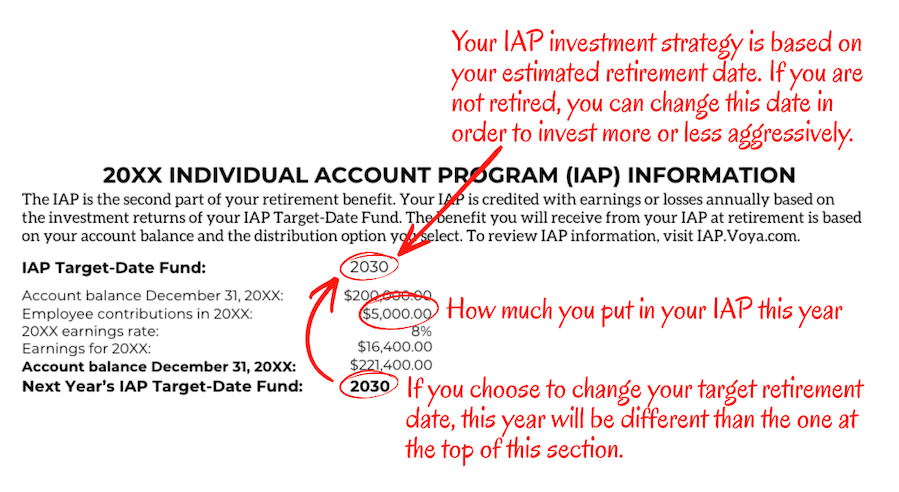
This section can tell you your IAP account balance, average return, and target date funds. As of 2018, your target date is automatically set based on your birth year, but you can request to change that target date in order to invest more or less aggressively.
When you retire and receive your pension, you’ll also have options for what to do with your IAP. You could:
- Rollover your funds into an IRA
- Rollover the amount into an Oregon Savings Growth Plan
- Take distributions
It’s important to note that your IAP must be rolled over or distributed within 15 years of your retirement.
Section 5: The Employee Pension Stability Account
Established in 2020, the Employee Pension Stability Account, or EPSA, is a portion of your salary used to help pay for your pension benefits. It’s based on your salary, and many may find they’re not paying anything into the EPSA at all.
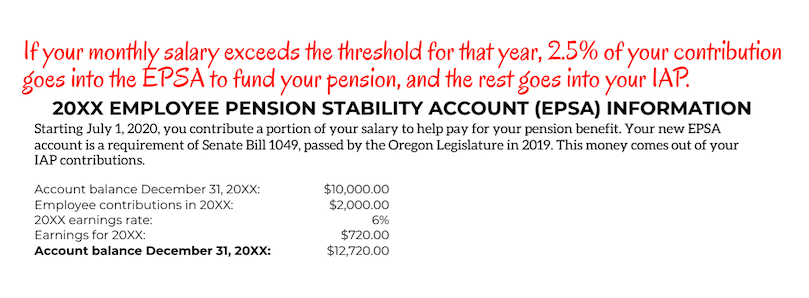
But if you are over the set monthly threshold, you’ll be paying 2.5% of your IAP into this account to fund your future pension benefit and the rest will go into your IAP. If you see this section on your annual statement, you are paying into it. For 2026, the threshold is a monthly salary of $3,890.
Additional saving option: Oregon Savings Growth Plan (OSGP)
The Oregon Savings Growth Plan is an additional way to save for retirement and is not part of the IAP or pension. This is a separate 457 supplement plan that you can opt in to and save even more for retirement. To learn more about the OSGP, click here.
Plan Your Retirement with Clarity
Knowing the ins and out of your retirement can be tricky, but we can help. Click here to schedule a meeting with Clarity today.
Want to learn more about what a financial advisor could do for you? Check out our article, “8 Ways Working with a Financial Advisor Can Help Improve Your Life.”